
By Screen Media Works Editorial TeamUpdated
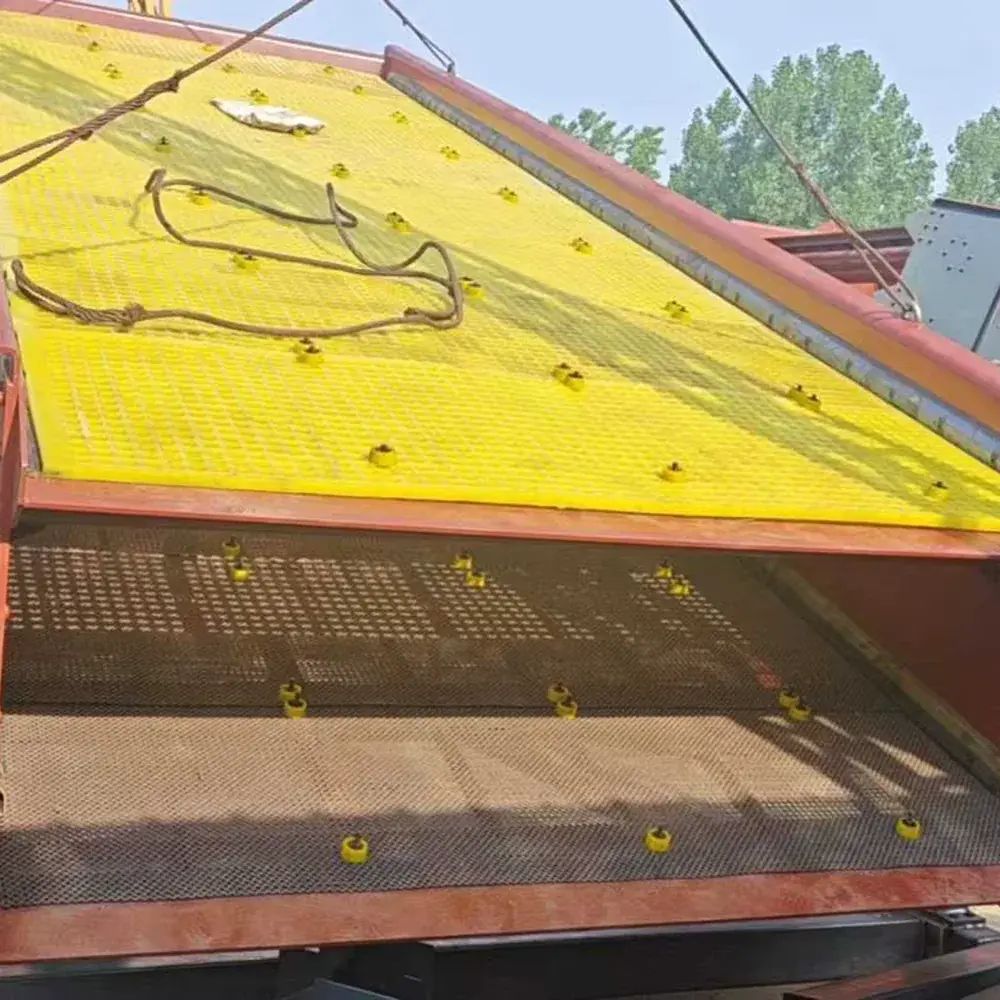
Vibrating screen panel wear: start with the pattern
Premature vibrating screen panel wear can occur when the screening media, feed arrangement, support system or operating duty do not match. The six checks below cover feed impact, uneven distribution, excessive bed depth, feed and construction mismatch, worn supports or fixings, and abnormal screen motion. These are possible contributors, not a diagnosis from the material name alone. This guide covers both modular panels and tensioned screening media where relevant. Their support and retention systems are not interchangeable: tension guidance applies only to the specified tensioned product and deck design, while modular panels must be checked against their own support and hold-down arrangement.
Record where wear begins, whether it is even across the deck, how quickly it progresses and whether the feed, throughput, aperture or machine settings changed recently. Where records exist, compare wear after a known number of operating hours or tonnes; elapsed calendar time alone can hide major differences in duty.
1. Feed impact: protect the first rows
If material drops directly onto the first rows of screen media, the feed end can wear much faster than the rest of the deck. A high drop height and high feed velocity increase the impact on the media and can also threaten the supporting structure. Metso recommends distributing feed across the full equipment width, limiting drop height, placing feed over feedbox liners rather than directly onto screening panels, and using chute deflectors where suitable to reduce feed speed.
Inspect the feed chute, rock box, feedbox liners and impact zone. Replacing a panel alone will not correct a chute that directs material onto the screening surface. Any change to chute geometry or impact protection should be checked against the equipment design and site maintenance procedures.
- Look for deep, localized wear on the feed-end panels or the first rows of apertures.
- Check whether the feed stream lands on the feedbox liner or directly on the screening media.
- Review drop height, feed velocity and distribution before specifying a different panel material.
2. Uneven feed distribution
An off-centre or narrow feed stream can overload one part of the deck while leaving other areas underused. This creates uneven vibrating screen panel wear and wastes available screening area. Compare the wear pattern with the actual material path and check whether feed is spread across the full width.
- Check feeder alignment, chute geometry and whether multiple feed streams are loading one area.
3. Excessive bed depth
Feed rate affects bed depth. Metso's Crushing and Screening Handbook explains that an excessively deep bed slows stratification and reduces opportunities for undersize particles to reach the openings; it also notes that an overly shallow bed may leave the material layer too thin to keep particle movement under control. Sandvik's troubleshooting guidance explains that a shallow bed can let particles bounce and reduce screening accuracy, and that excessive bed depth can increase media wear, shorten service life and restrict screen movement. Sandvik's maintenance guidance further notes that modular media without steel reinforcement can sag under overload when feed is too dense or the material bed is too deep. McLanahan also warns that excessive material weight can reduce screen stroke and stratification, and that exceeding screen capacity can crack rubber media. Restore even distribution and operate within the screen's designed loading range; simply reducing tonnage is not always the correct fix.
- Compare material depth on the left, centre and right sides of the deck.
- Compare actual feed rate and feed-size distribution with the screen's design duty.
4. Feed size, abrasiveness and panel thickness
Large or dense particles can damage a panel when they exceed the media design's maximum particle-size or bulk-density limits. Material abrasiveness, particle shape, moisture, feed velocity and cumulative tonnage are useful duty variables to record; their effects on wear depend on the media design and operating conditions. Compare the actual feed-size distribution and the coarsest particles with the supplier's application limits; nominal aperture size is not a substitute for a feed specification.
Thickness is a trade-off, not a simple upgrade. Metso notes that thinner media can be more flexible, but heavy material loading can cause higher wear on thinner media. Thickness also affects flexibility and effective opening, so a change in thickness must be assessed together with aperture geometry, panel construction, support spacing and feed load. Do not assume that a thicker panel will automatically last longer.
- Record the full feed-size distribution, not only the nominal cut size.
- Confirm maximum particle size and bulk-density limits for the exact panel design.
- Do not assume that a thicker panel will last longer or maintain the same separation performance.
5. Vibrating screen panel wear at supports and fixings
A sound panel can fail early when it is not fully supported or retained. Worn or missing support profiles, degraded capping rubber, uneven support height, loose hold-down bolts, incorrect clamp parts or poor seating can allow movement and rubbing. Metso documents premature damage where support profiles had worn down and the screen cloth could no longer be tensioned correctly; it also identifies panel movement against supports as a source of wear.
For tensioned media, excessive, insufficient or uneven tension can cause premature failure. For modular panels, check that every intended support and retention point is engaged and that hold-down bars and bolts remain secure. Follow the installation instructions for the exact screen and media design; do not transfer tension values from another system.
- Inspect support profiles, capping rubber, clamp rails, hold-down bars and fasteners during each changeout.
- Confirm that the panel sits firmly on all intended supports and that no support is missing or excessively worn.
- Use the correct retention components and the screen manufacturer's installation procedure.
6. Screen motion, vibration and operating load
The screen's motion path, measured stroke/displacement, drive rotation speed, vibration frequency, deck inclination and feed loading all influence how material moves, stratifies and contacts the screening surface. Metso's screening handbook explains that particle travel and the number of passage attempts depend on the relationship between amplitude and frequency. These parameters are application-specific, not universal panel-life settings. Metso's service guidance distinguishes amplitude from total displacement (twice the amplitude in that guide's terminology), while Sandvik defines stroke as the distance the screen moves during operation. Use the screen OEM's terminology and reference values; do not assume that amplitude, stroke and total displacement are interchangeable. A change in screen motion can alter the operating duty and should trigger a machine-level check.
Record the measured stroke (using the OEM's definition), stroke angle, drive rotation speed (RPM) and, where available, vibration frequency (Hz) and natural frequency from an inspection report. Compare them with the screen manufacturer's design values and operating manual. Metso lists vibrating stroke, stroke angle and natural-frequency measurements as part of professional inspections, and recommends routine checks of springs and bolted joints. Sandvik defines G-force as the acceleration acting on a screen; include a measured G-force only if it is already available from an instrumented inspection, not as a value to estimate from photographs or guess. Investigate uneven motion, abnormal vibration, loose fasteners, worn springs or structural movement before blaming the panel material. Do not change counterweights or drive settings as a panel-life experiment without OEM guidance.
- Check the measured stroke/displacement, stroke angle, operating rotation speed and vibration frequency against the equipment manual, using the OEM's definitions.
- Investigate unusual or asymmetric motion, loose structural bolts, damaged springs and material build-up.
- Have the screen supplier or OEM review any proposed change to counterweights, speed or stroke.
Read the wear pattern: useful clues, not a final diagnosis
Photographs of vibrating screen panel wear can help narrow the investigation, but the same visible symptom can have more than one cause. Use the pattern to decide what to inspect next, then confirm it against the feed arrangement, support condition and operating data.
| Visible pattern | Possible contributors | What to inspect |
|---|---|---|
| Deep, localized wear at the feed end | Direct feed impact, excessive drop height, high feed velocity or a concentrated feed stream. | Feed chute, rock box, feedbox liners, drop height and feed distribution. |
| One side or one lane wears faster | Off-centre feed or uneven material distribution across the deck. | Material depth across the full width, feeder alignment and chute arrangement. |
| Wear marks along support lines or damage on the underside | Worn or missing support profiles, deteriorated capping rubber, poor seating or panel movement. | Support height and spacing, capping rubber condition and contact between the panel and deck. |
| Cracks or tears near edges and fixing points | Incorrect retention, loose or missing fasteners, or worn clamp components; uneven tension is a possible cause for tensioned media only. | The exact fixing system, clamp rails, bolt condition and, for tensioned media, the OEM tensioning procedure. |
| Sagging, stretching or a concave centre | On some non-steel-reinforced modular panels, excessive loading, a deep material bed or feed beyond the design limits; insufficient stiffness or support may also contribute. | Feed tonnage, maximum particle size, bed depth, panel reinforcement and support spacing. |
| Thinning aperture bridges, exposed backing or holes | The media is approaching or has reached the end of its useful service life. | Aperture condition and product quality; plan replacement before openings break through. |
Choose a replacement without repeating the failure
Reducing vibrating screen panel wear starts with correcting the underlying cause where possible before installing new media. Then match the replacement to both the deck and the operating duty: overall dimensions and thickness; aperture size, shape and orientation; panel format and retention; support spacing and capping; feed-size distribution, bulk density, abrasiveness, moisture, impact location, screen loading and measured screen motion. Confirm the exact material grade and design limits with the supplier.
A thicker panel or a change from wire to rubber or polyurethane is not automatically the right fix. A replacement that does not fit the support interface or feed conditions can wear prematurely even if its material has higher abrasion resistance. Compare service interval and cost per tonne for the same duty, and do not treat a generic wear-life estimate as a guarantee.
- Identify and correct feed impact, uneven distribution or worn supports before selecting a new panel.
- Match the replacement's dimensions, aperture, thickness and fixing arrangement to the existing deck or approved redesign.
- Compare expected wear life and cost per tonne using the same material, throughput and operating basis.
What to send for a technical replacement review
A useful replacement review combines photographs with a small amount of operating information. Send what is available first; drawings, samples and additional measurements can follow if needed. Do not apply tension values or installation steps from a tensioned screen to a modular panel, or vice versa.
- Screen make/model reference, deck position and the number of decks.
- Current media type, panel length and width, thickness, aperture size, shape and orientation.
- Fixing method, support spacing, and the visible condition of support profiles and capping rubber.
- Photos of the top surface, underside, edges, fasteners, installed deck and feed chute.
- Feed material, size distribution, maximum particle size, bulk density if known, abrasiveness, moisture and approximate throughput.
- Wear location and service history, including operating hours or tonnes since installation and any recent process changes.
- Measured stroke/displacement and stroke angle; drive rotation speed (RPM), vibration frequency (Hz), natural frequency or G-force, if these are already recorded in an inspection report. Use the OEM's definitions; these details are optional and are not required for an initial enquiry.
- Required quantity and destination.
Related resources
- Screen Panel Replacement Guide
Review panel dimensions, apertures, fixing details and photos before requesting a replacement.
- Polyurethane Screen Panels
Review polyurethane screen formats and configurations when considering a replacement.
- Request a Quote
Send the current screen details and operating conditions for a technical quotation review.
- Modular Polyurethane Screen Fixing Systems: 4 Types
Identify supports and retaining parts when reviewing damage near a panel interface.
- Vibrating Screen Blinding vs Pegging: 6 Checks
Separate blockage observations from the evidence used to assess wear.
Technical references
- Metso — Tips for installation and start-up of vibrating equipment
Manufacturer guidance on feed distribution across the deck, limiting drop height, using feedbox liners and reducing feed speed to protect screening media.
- Metso — Screening solutions: Screening media challenges and how to solve them
Manufacturer guidance on support-profile wear, capping rubber, tension, uneven feed distribution and the trade-off between media thickness, flexibility and loading.
- Sandvik — Maintenance and replacement advice
Manufacturer guidance on maximum particle-size and bulk-density limits, panel sagging under overload, tensioned-media installation, support bars, capping and visible end-of-life signs.
- Metso — Crushing and Screening Handbook, 7th edition (2023), Screening chapter
Manufacturer handbook, printed pages 91–92, explaining how bed depth affects stratification and how amplitude and frequency influence particle travel and passage attempts. These are process principles, not universal panel-life settings.
- Metso — Screen and vibrating feeder inspections (updated November 2025)
Current manufacturer inspection guidance covering feed distribution, material bed depth, spring and bolted-joint condition, plus professional measurements of vibrating stroke and stroke angle.
- Sandvik — Trouble shooting examples
Manufacturer troubleshooting guidance on feed arrangement and bed depth. It states that an excessively deep bed can increase media wear, shorten service life and restrict screen movement, while a shallow bed can cause particles to bounce and reduce screening accuracy. Sagging of non-steel-reinforced modular media is covered separately in Sandvik's maintenance guidance.
- McLanahan — How to Choose the Right Type of Screen Media for Your Aggregate Plant
Manufacturer guidance warning that excessive material weight can reduce screen stroke and stratification and that exceeding screen capacity can crack rubber media.
- Metso — Service Tip: Checking the amplitude of a vibrating screen
Manufacturer guidance distinguishing amplitude from total displacement, explaining the relationship between amplitude and operating rotation, and warning that rotation and counterweight adjustments must follow application-specific guidance.
- Sandvik — Screening terminology
Manufacturer glossary defining stroke, G-force, inclination, support bars and other screening terms.